Tametsi review (Grip Top Games, PC, 2017)
Grid-unlock
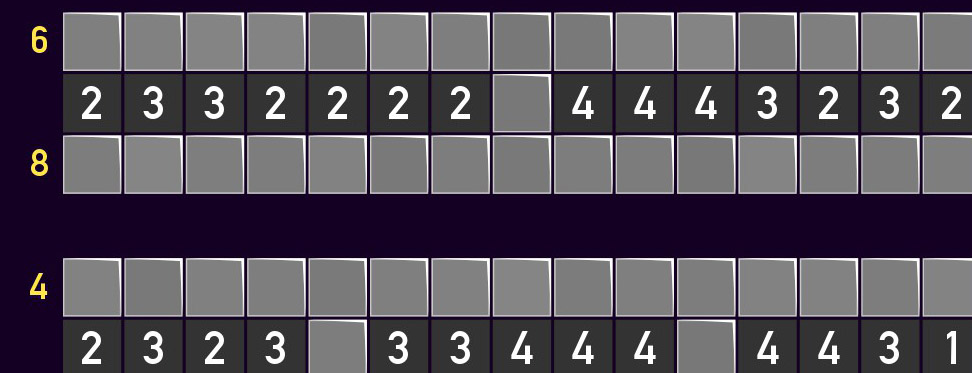
At its heart, Tametsi is Minesweeper, both in mechanics and presentation. I don’t know who I’m explaining Minesweeper to, but the premise is that you have a grid of tiles and there are numbers on some of them. The numbers indicate how many of the adjacent tiles are mines. Mark the mines with right-click and click on the spaces that you believe don’t have mines. If you click on a mine, you lose.
Here’s where the variations come in: Tametsi’s puzzles have square tiles but also hexagonal and a variety of other shapes. Some puzzles, using the cutting edge of technology, even have a mix of different shapes and/or sizes. Whether or not a puzzle counts the tiles at the corners as being adjacent is indicated by a yellow, X-shaped four-way arrow in the upper-right corner of the screen. More than once I accidentally miscounted because I didn’t notice this little icon or got used to including corner tiles as adjacent. To the game’s credit, it did mention the icon during one of the initial tutorial levels, but I must not have even looked up at it at the time and later found myself wondering what it meant. Oops.
If you click on a mine, you are told that you did so in a manner that to the outsider looks pretty tame, but that in the moment feels startling. A red banner appears across the screen and the worst sound in the world plays. You then have the option of undoing your move or resetting the level, but if you undo, the level is not considered completed. You have to reset the level and complete it from scratch in order to have it marked as done on the level select screen. What’s funny is the level complete reaction is similarly abrupt, even more so than the mistake reaction. The background of the puzzle screen changes instantly from dark to light, and a couple of times I thought I had actually made a mistake for a split-second before I realized I had beat the level.
For each of the game’s 100 main puzzles and 60 bonus puzzles, the game tells you how many mines you have left to mark, but it only calculates it based on the total number of mines minus how many tiles you have marked so far. You aren’t told when you mark a space incorrectly, but you won’t be able to complete the level if you do. The level is only considered finished when you start from the beginning, reveal every non-mine space and mark every mine without clicking any. This is cool and chill on the first half of the levels when accidentally clicking on a mine means having to redo a handful of clicks, but increasingly stressful, especially when you have found 80 of 100 mines through laborious mental checks and rechecks, and then you are suddenly told that you need to do all that again. Near the end of the last levels I was practically sweating while looking at the few spaces I had left to uncover, double- and triple- checking every click so that I wouldn’t make a mistake and have an hour or more of effort wasted. At least at that point I was consistently checking for the corner tile icon!
Besides just using the basic Minesweeper logic to separate the mines from the nines, (copyright paste 2026) (yes, I know there are no nines in Minesweeper), the game throws you a few other mechanics. This is where Tametsi really shines. Once you get down to the last few mines, you often have to use the remaining number of mines to work out which can be safely cleared. Some tiles are a different color; another number in the upper right will tell you how many of that color tile have a mine in them. Sometimes rows or columns or angled lines have a number indicating how many mines are in that row or column or angled line. Especially in the later levels, you end up using a combination of two or more of these mechanics as your mental metal detector.
The puzzles are great. Each puzzle can be completed simply using logic, without guessing, as the game tells you. The difficulty curve is pretty steady, with a handful of later levels being a little easier once you realize what new strategies you might need to employ. Occasionally a level would take me a long time simply because I missed a tile that had all its requisite neighbors marked and I didn’t click the rest around it. Sometimes I even accidentally ended up using more complicated logic when very simple logic would have sufficed, because I am very smart. More often than not I had to keep methodically checking multiple facets of a puzzle (number in row/column, number of color left, etc) in order to pick out the solvable spots. The game also comes with a “drawing mode”, which is just what it sounds like. You essentially pause the game (even though there is no time limit involved; you just can’t click on spaces) and are given a palette with which you can choose colors to draw all over the game board. When you exit drawing mode, the marks disappear, but reappear when you re-enter drawing mode. You can do that several times to flip back and forth to help you figure out what you’re missing. It helps immensely when playing out hypotheticals that might help you figure out a mine or empty space. The only downside is that any drawings you do don’t get saved for your next game session or if you restart a level.
There is a lot to look at in some of the bigger levels. The later levels took up most of my time, sometimes upwards of an hour per puzzle. At time of writing I have sunk 67 hours into Tametsi, according to Steam, but I will admit that I would occasionally just leave the game running to go do something in the other room. I would say at least 55 hours were spent looking at the game, though. Despite the size and difficulty of the later levels, they were not overwhelming. Only once or twice did I open up a blank level and think to myself “oh man”, but in almost every case the level would start to get moving quickly and I would get the feeling of making progress. I would often have to be patient, and I spent a lot of time just looking and thinking.
The look of the game is Tametsi’s weakest point, or perhaps the UI in general. The presentation is very spare, with just a blank color for the background and very little for a HUD. The fonts are unremarkable. The graphics for the icons, while HD, are reminiscent of the awkward pixel art of pack-in Windows 3.1 games. To go back to the level select from a puzzle, you click the unmarked off-color triangle in the upper left corner. To go back to the title screen, you click that same triangle. And then, to exit the game? No, not the triangle. A small red stop sign in the bottom right that says EXIT on it! Why? I suppose it could be to avoid accidentally triple-clicking out of the game? Although, to be honest, I never went back to the title screen for anything other than exiting, so that doesn’t seem likely. It just seems like a strange UI design quirk.
Speaking of weird design quirks, when you start the game, you are presented with what at first glance looks like the standard Unity pre-game launcher. Every time I am confronted with those, I check the graphics/windowing options the first time I open the game and then click right through them every other time. If something is busted when I’m playing the game, maybe I’ll go back and adjust the options there. Tametsi, for some reason, puts all of their game options except turning sound on and off into another tab of that intro screen. Not even the main tab where it will jump out at you and be seen. Can you get back to this window from inside the game? No, you have to exit the game and restart. Thankfully the game loads very fast, but the choice to make access to the game options behind a restart is very odd. And I’m not just talking about things like light/dark mode or inputs; these are options that are integral to gameplay, such as graying out finished numbers, an option I wish had been on by default but which I only discovered the existence of three quarters of the way through the game.
“Surely,” you say, “the game told you that options were available in the launcher?” Well, kind of. On the title screen, the game cycles very slowly through “tips” such as “The erase color is drawing mode is larger than the normal pen.” Great. Not really important to me, since I already kind of figured that out through normal use of the drawing mode, but okay. Thank you, game. After seeing a couple of these hints that were not really pertinent, I kind of tuned them out, and very much did not wait around ten seconds each time to see another one. “A puzzle’s title will turn from blue to white if you reveal a mine” just doesn’t add to my gaming experience. Unfortunately, this is where the game tells you about the options screen, and then even in a sort of roundabout way. At times I just frustratingly looked around on the puzzle screen, the level select screen and even the title screen about, wondering if there were options I could mess around with. It never occurred to me that options would be hidden in a one-time-per-game-session launcher window until I just happened to see that one tip. And that’s not the only important tip. Holding the ctrl button when you hover over a tile highlights all the adjacent tiles. That may sound unnecessary, but with some of the more oddly shaped tiles, it’s extremely useful. These should be emphasized in a tutorial level; there’s no reason to hide them away in these barely visible tips, and they would’ve made the game less frustrating at parts.
As I mentioned, there is no in-game timer, and no option for a timer. There are no saved stats that I could find, so the only real numbers I have to work with are my Steam play time estimates. The addition of in-game stats would have been a nice touch. I think most of the dev time went into making the puzzles, which I appreciate, but other game design elements are important as well. However, it is still easy to appreciate the number and quality of puzzles you get in Tametsi, especially for 3 USD!
“Tametsi” is latin for “although”. I have no idea why they called it that; maybe it just sounded nice. So, tametsi the UI is kind of weird, the quality of the puzzles made it very much worth my time. I recommend it to anyone who likes straight-up logic puzzles or pen-and-paper-type puzzles like nonograms with a little more challenge.